


MAGI-2 AI video generator: long takes with sound
Write a scene or upload a photo, and MAGI-2 makes a 1080p video of 4 to 30 seconds with sound. Priced per second; you see the total before you create.

Macro close-up of a barista pouring steamed milk into an espresso cup, forming latte art, morning light through a café window. Milk hissing from the steam wand, the soft clink of the cup on the saucer, quiet café chatter. Static camera, shallow depth of field.
What is MAGI-2?
MAGI-2 is Sand AI's video model, released on November 24, 2026. It makes the picture and the sound together in one pass: you describe a scene, or give it a first frame, and it returns a 1080p clip of 4 to 30 seconds with dialogue, sound effects, ambience or music already in it. MAGI-2 is a different release from MAGI-2 Preview, which Sand AI put out in August 2026 as open weights on Hugging Face: a smaller model (about 114 billion parameters, 6 billion active) that makes 10-second clips. Sand AI says the full MAGI-2's weights will be released later, and has not given a date.
Length is MAGI-2's headline feature. One take can run up to 30 seconds: long enough for a character to walk into a room, say a few lines and react, or for a camera to cross a whole street market without a cut.
MAGI-2 AI (aimagi2.com) is an independent site, not run by Sand AI. It puts MAGI-2 text to video and MAGI-2 image to video in one generator, shows what each clip will cost before you start, and needs no graphics card, app or code.
MAGI-2 at a glance
What you get when you run MAGI-2 on this site.
- Made by
- Sand AI
- Released November 24, 2026.
- Model (per Sand AI)
- 480B-parameter mixture of experts
- About 28 billion parameters active at a time, rendering at 25 frames per second.
- Starts from
- A text prompt or a first frame
- Add a last frame as well when you want to set where the shot ends.
- Clip length
- 4 to 30 seconds
- Any whole number of seconds; 5 is the default.
- Resolution
- 1080p
- Every clip, so there is no quality level to pick.
- Sound
- On by default
- Dialogue, sound effects, ambience and music, made with the picture. Switching it off gives a silent clip at the same price.
- Aspect ratios
- 16:9, 9:16, 1:1, 4:3, 3:4, 21:9
- For text to video; 16:9 is the default. Image to video follows the nearest one to your first frame.
- Output
- One video per run
- Download it as a video file once it is ready.
- Price
- Per second, same for text and image to video
- With or without sound. The generator shows the total before you create.
- Account
- Free to create; clips are paid per second
- Runs in your browser. No app, graphics card or code needed.
- Not with MAGI-2 here
- Reference inputs and video editing
- MAGI-2 runs text to video and image to video here (first frame, optional last frame).
- Commercial use
- With a paid plan or credit pack
- Videos made on a paid plan or with a credit pack can be used commercially; videos made only with free credits are for personal use. A commercial right is not a music license: you are still responsible for any song, lyrics or voice likeness in a clip.
MAGI-2 AI video: long takes, sound and speech
Four things to plan a clip around, and what each one is good for.
One take up to 30 seconds
Set any length from 4 to 30 seconds. A longer take lets a scene play out in full: a slow push-in across a busy market, a cooking step from start to finish, a character who enters, talks and leaves, with no cuts to hide later.
Lines spoken on screen
Write dialogue in quotes and say who speaks it, and MAGI-2 voices the line with mouth movement to match. Short, natural lines work best.
Sound made with the picture
Footsteps, a closing door, rain on a window, room tone or a music bed are generated in the same pass as the frames, to line up with the action. Say what we should hear in the prompt. Leave it out and MAGI-2 chooses the sound on its own.
Start from your own picture
Upload a photo, product shot or render as the first frame and MAGI-2 carries the shot on from it. Add a second picture as the last frame when the ending has to look a certain way. The clip follows the shape of your first frame.
MAGI-2 sample videos and their prompts
Three clips made on this site with MAGI-2 text to video, 8 seconds each with sound on. Each prompt is shown exactly as it was written.
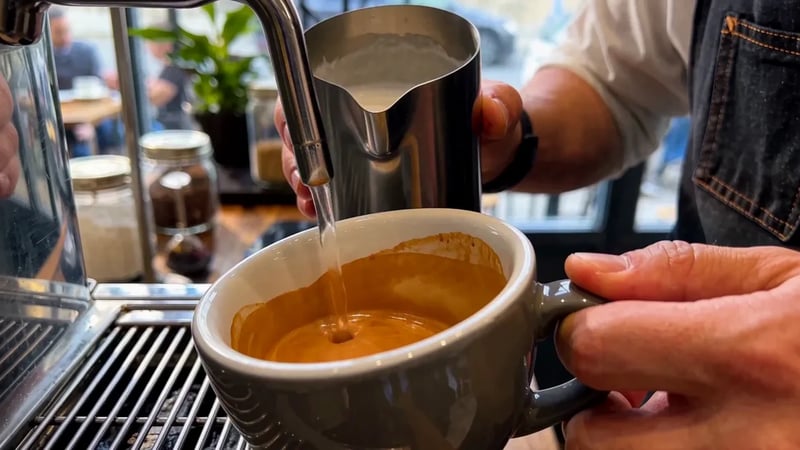
A café close-up with its sounds
Prompt: "Macro close-up of a barista pouring steamed milk into an espresso cup, forming latte art, morning light through a café window. Milk hissing from the steam wand, the soft clink of the cup on the saucer, quiet café chatter. Static camera, shallow depth of field."
16:9, 8 seconds. The prompt names three sounds; play the clip with the sound up to hear how MAGI-2 placed them against the pour.
Two lines of dialogue in one take
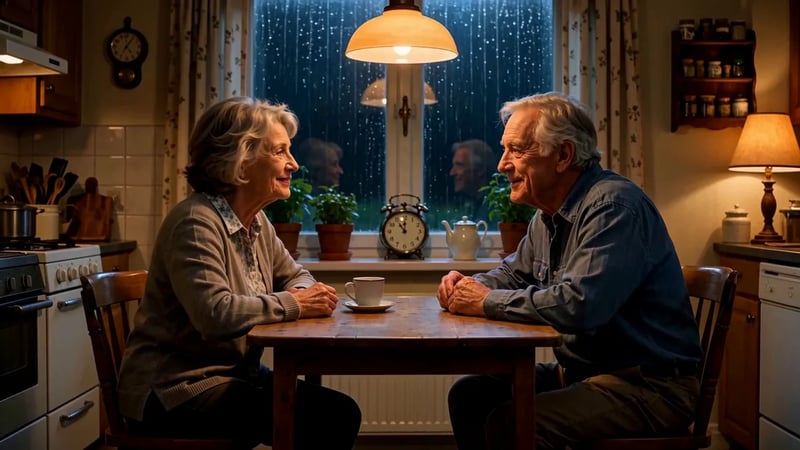
Prompt: "Two old friends sit at a small kitchen table at night, warm lamp light, rain on the window. The woman slides a key across the table and says, "It's yours now." The man looks at it, laughs softly and says, "You kept it all these years?" Slow push-in, quiet rain and a ticking clock."
16:9, 8 seconds. Both lines are written in quotes with the speaker named. The wording and timing can come out slightly different from what you wrote, so listen before you reuse a line.
A 9:16 vertical clip
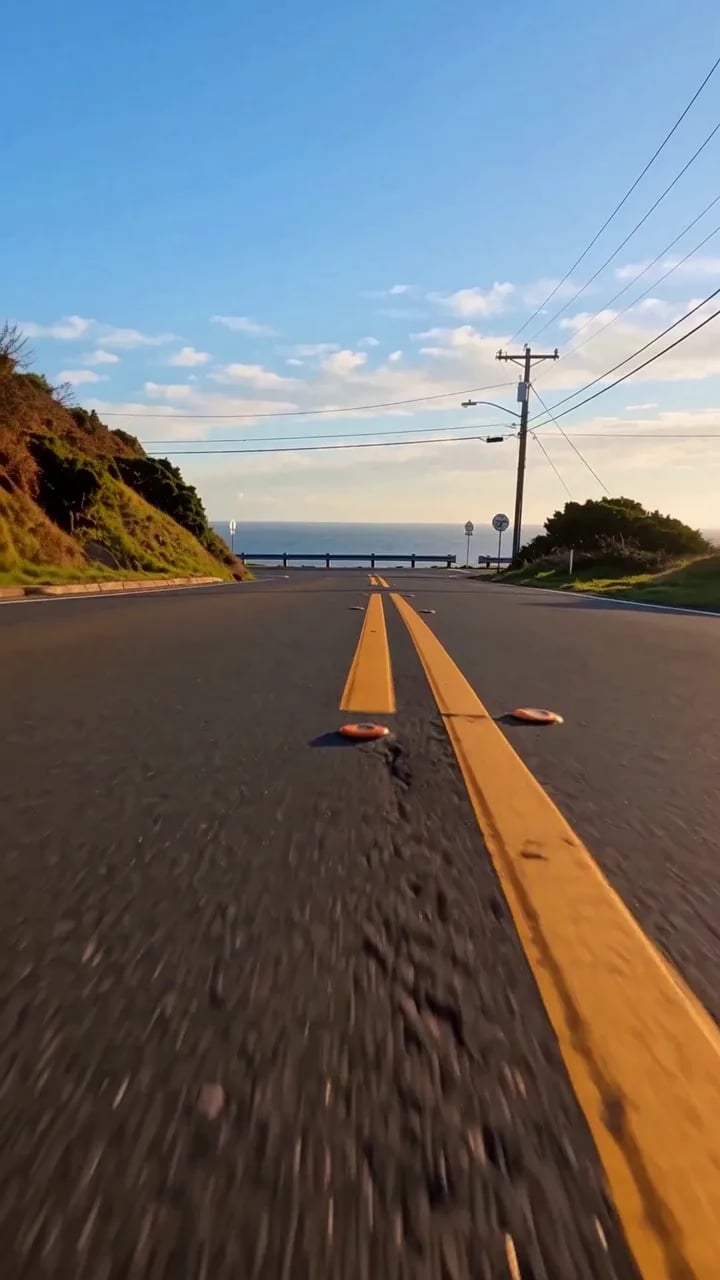
Prompt: "Vertical shot of a skateboarder rolling down an empty coastal road at golden hour, camera tracking alongside at board height, then rising to reveal the ocean. Wheels on asphalt, wind, distant gulls."
9:16, 8 seconds, 1080 by 1920. Pick 9:16 in the generator when the clip is for Reels, Shorts or TikTok.
How to use the MAGI-2 AI video generator
Three steps, whether you start from words or from a picture.
- 1
Write the scene or add a frame
Describe the shot, the action in order and what we should hear. To start from a picture, switch to image to video and upload it as the first frame; add a last frame if you want to fix the ending.
- 2
Set the length and shape
Choose 4 to 30 seconds and, for text to video, one of six aspect ratios (image to video follows your first frame). Keep clips short while you work out a prompt, then go longer once the scene behaves. Sound is on; switch it off if you only need the picture.
- 3
Create, listen, download
Create the clip, play it back with the sound up and download it. If something is off, change one line of the prompt and run it again.
How to write a MAGI-2 prompt
MAGI-2 reads a prompt like a short script. For a long take, describe what happens in order, the way a director talks a crew through a shot, and give the sound its own sentence. Treat the structure below as a starting point: drop any part your scene does not need.
The order matters more than the length. A prompt that says what happens first, then next, then last gives a 20- or 30-second clip something to do from start to end, instead of one moment stretched thin.
Example: Slow handheld push-in at eye level. A baker in a flour-dusted apron stands behind the counter of a small bakery at dawn. She slides a tray of croissants onto the shelf, wipes her hands on her apron, then looks up at the camera and smiles. She says: "First batch of the day. Still warm." An oven fan hums, a bell rings over the door, soft radio music plays in the back.
1Shot and camera. 2Who is on screen, and where. 3What happens, in order. 4Dialogue, in quotes. 5What we hear.
- Shot and camera — One framing and one move: a slow handheld push-in at eye level, a wide static shot, a drone pull-back. Say "static camera" if nothing should move but the subject.
- Who is on screen, and where — The people or things in the frame and the place, with the details that matter for the look: a baker in a flour-dusted apron, a small bakery at dawn.
- What happens, in order — The action as a sequence, joined with "then". For a long take, give it a new beat every 5 to 10 seconds.
- Dialogue, in quotes — Who speaks and the exact line: She says: "First batch of the day." One or two short lines per speaker work best.
- What we hear — Two or three sounds that matter, such as an oven fan, a bell over the door or soft radio music. Leave this out and MAGI-2 chooses.
When a MAGI-2 clip needs another try
Change one thing at a time, and keep what already works. Sand AI lists very fast motion and complex, layered soundscapes among MAGI-2's known limits, so most fixes start there.
Fast action smears or breaks apart
- Change next
- Slow it down: one clear action at a time, or add "in slow motion". Swap a sprint for a jog, a spin for a turn.
- Leave alone
- The length and the camera line.
The sound turns muddy when a lot happens at once
- Change next
- Name the two or three sounds that matter and drop the rest, or switch sound off and add your own audio.
- Leave alone
- The picture part of the prompt.
A spoken line comes out different
- Change next
- Shorten the line, keep it in quotes, say who speaks it and run it again.
- Leave alone
- The rest of the scene.
A long take drifts or repeats itself
- Change next
- Write the action out in order, with a beat for every 5 to 10 seconds, or shorten the clip.
- Leave alone
- The shot and the setting.
The opening is not what you pictured
- Change next
- Start from your own picture: switch to image to video and upload it as the first frame.
- Leave alone
- The action and sound lines.

MAGI-2 pricing and credits
Plans and credit packs add credits to your account, and each MAGI-2 clip spends 20 credits per second of video. Text to video and image to video cost the same, with or without sound, so a 4-second clip is 80 credits and a full 30-second take is 600. The generator shows the total before you create.
Up to 333 images or 10 videos
- Up to 333 images
- Up to 10 videos
- All models, including Premium
Up to 833 images or 25 videos
- Up to 833 images
- Up to 25 videos
- All models, including Premium
Up to 2,500 images or 75 videos
- Up to 2,500 images
- Up to 75 videos
- All models, including Premium
Failed runs are refunded automatically · Cancel anytime
MAGI-2 questions
No. MAGI-2 clips are paid per second of video, 20 credits a second, so the shortest 4-second clip costs 80 credits. Creating an account is free, and the generator shows the total before you create, so you can write a prompt and upload frames first.
No. MAGI-2 AI (aimagi2.com) is an independent site that runs Sand AI's MAGI-2 model in your browser; it is not made, run or endorsed by Sand AI. Sand AI makes the model, and this site provides the generator, your account, your saved videos and billing. For account or payment questions, use the Contact page.
Not the full model yet. Sand AI released the earlier MAGI-2 Preview as open weights on Hugging Face under the Apache 2.0 license; its model card asks for eight NVIDIA Hopper data-centre GPUs to run it. For the full MAGI-2, Sand AI says the weights will follow later, with no date given. This site runs MAGI-2 in your browser, so you need no graphics card of your own.
Each run makes one clip of 4 to 30 seconds, in whole seconds (5 by default). For a piece longer than 30 seconds, plan it as several shots and join them in your editor. Saving the last frame of one clip and using it as the first frame of the next can help the shots line up.
Yes. Put the line in quotes and say who speaks it, and MAGI-2 generates the voice with lip movement to match. Short, natural lines work best. The wording and timing can come out slightly different from what you wrote, so listen to the clip before you publish it.
Yes, that is MAGI-2 image to video. Switch the generator to image to video, upload the photo as the first frame and describe what should happen. You can add a second picture as the last frame to set the ending. The clip follows the nearest of the six aspect ratios to your first frame.
Both make 4 to 30 second clips with sound, and both run in the generator on this site. MAGI-2 renders every clip at 1080p and costs less per second here than Seedance 2.5 at any of its resolutions; Seedance 2.5 goes from 480p up to 4K and can also start from reference images, clips and audio. In Higgsfield's blind arena (snapshot of November 24, 2026), Seedance 2.5 won 61% of head-to-head votes against MAGI-2.
See MAGI-2 vs Seedance 2.5: price, 4K, length and blind votes
MAGI-2 here runs text to video and image to video: start from a prompt, or from a first frame with an optional last frame, and get one 1080p clip of 4 to 30 seconds with sound. It does not take extra reference images, audio or video clips as input, and it cannot edit a video you already have; Sand AI lists reference inputs and video editing among MAGI-2's features, but they are not available here. The same generator also offers Seedance 2.5, which takes reference images, clips and audio.
Yes, if you made them on a paid plan or with a credit pack. Videos made only with free credits are for personal use. A commercial right does not license music, lyrics or a real person's voice or likeness, so check what you publish.
Make your first MAGI-2 video
Write a scene or upload a photo, choose up to 30 seconds, and hear it play back with sound.